Folder Structure Research
Feature-first
An (approximate) example of a feature-first structure, with a clear separation of responsibilities between technical infrastructure, business logic, and the user interface. The goal is to ensure scalability, maintainability, and low coupling.
N.B.: a core folder is added to prevent shared from becoming a dumping ground.
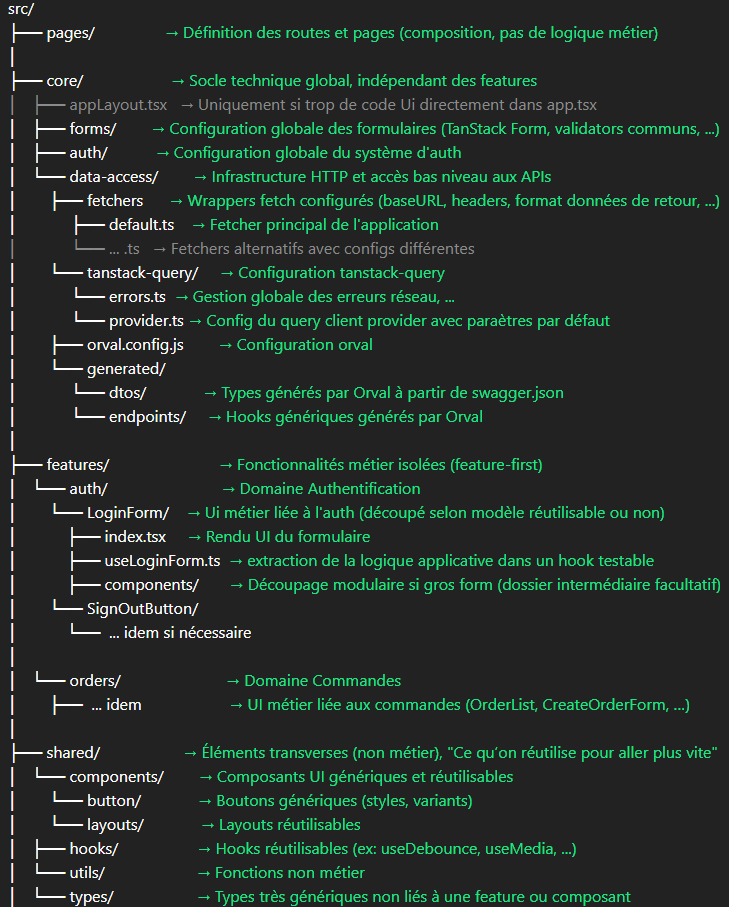
pages vs features
✅ What pages/* CAN contain
- Retrieving route params (
router.query,getServerSideProps) - Choosing the layout
- Composing components
- Passing props
- Deciding “which screen to display”
❌ What pages/* MUST NOT contain
- Business logic
features - Application hooks (use cases)
features - DTO → FormType mapping
features - Complex orchestration (workflows)
features - Direct calls to React Query or data-access
features
Internal structure of features/my-feature
A feature folder is a business-oriented UI module,
independent from routing,
that exposes cohesive building blocks to construct one or more pages.
⚠️ No dependency on routing (no router.query)
Must be passed via props from /pages
1. Screens
Business UI entry point.
features/orders/
├── order-overview/
├── create-order/
Contains:
- UI composition specific to a business intent
- Calls to application hooks (controllers)
2. Components (pure and reusable UI)
features/orders/
├── OrdersTable.tsx
├── OrderFilters.tsx
Contains:
- JSX
- props
- callbacks
- zero React Query
- zero business logic
❌ What a feature folder MUST NOT contain
- A mirror structure of
pages/: creates coupling with routing - Direct access to the router: routing is infrastructure
pages/ - Global layout logic: outside the feature scope
- Global providers: must live at the app level
Layout Management
Key principle
A layout is a UI composition decision, not a business one.
It describes how things are displayed, not what is done.
Types of layouts and where they belong
1. Page (route) layout
- Wraps the entire page
- Chosen by the routing layer
📍 In pages/
- Global directly in
_app.tsx, or extract UI intolayouts/defaultLayout.tsxif the file becomes too large and UI elements hurt readability - Shared contextual
shared/components/layouts/
2. Shared layout (non-business)
- Used by multiple pages
- Independent from business domains
📍 shared/components/layouts/
Examples: EditorLayout, DashboardLayout, FullWidthLayout, CenteredLayout, ...
3. Sub-layout (partial layout)
a) Business
- Structures a UI section tied to a domain
- Reused across multiple screens
📍 features/*/
b) Generic
- Reusable UI structure
- No business relation
📍 shared/components/layouts/
What NOT to do
- ❌ Layout inside a feature if it is decided by the route
- ❌ Business layout inside
shared/
Quick rule
The route selects the layout
The feature provides the business UI Business sub-layouts stay within the feature